Crocodile - Linux
- justinblawitz
- Oct 8, 2025
- 2 min read
Ping and Nmap the target Ip using sudo nmap -sC -sV {target Ip}
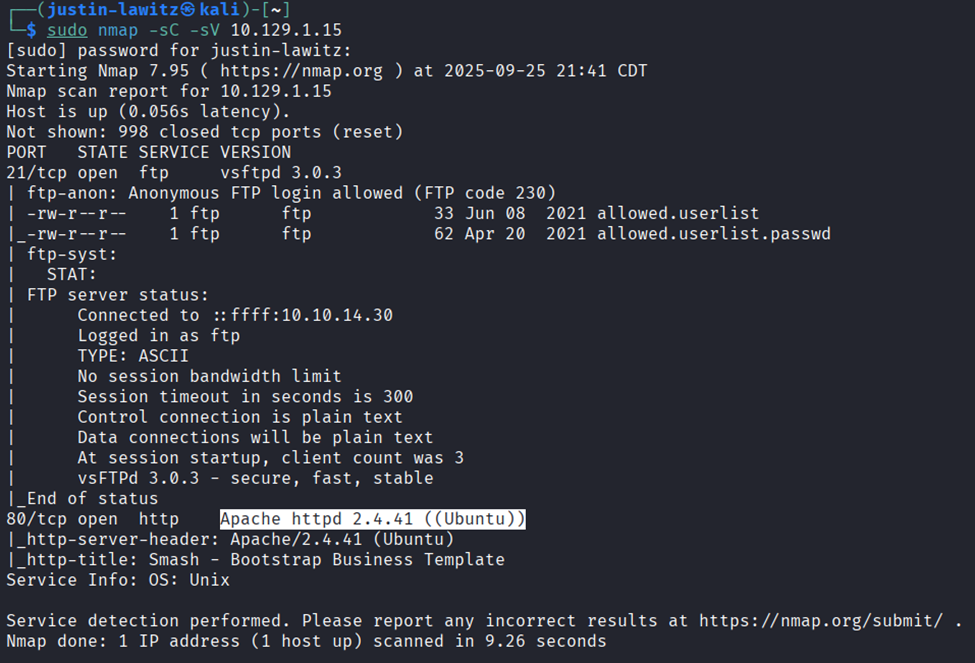
We find port 21/tcp open FTP server, and port 80/tcp open http server running Apache.
First, we’ll connect to the FTP server using ftp {target Ip}, we can use ftp -h for a list of commands if we want. Enter anonymous as the username because it doesn’t require a password. We know we can do this because under port 21, we can see “Anonymous FTP login allowed (FTP code 230)).

Once we’ve gained access to the FTP server, we can use help if we want to get a list of commands. In this case we’ll use dir which lists the directories which shows us the allowed.userlist and allowed.userlist.passwd. To download these files to our machine, we can use get file name to download the files and quit to disconnect from the FTP server.

Next, we’ll read the files we downloaded using cat file name.

If we want, we can try using these usernames and passwords to access the ftp server, but in this case, they’re used to access the web page we found on port 80. We can search the target Ip in a browser to find the web page is a server manager, and using a browser extension called Wappalyzer we can note the web page was coded using php.

After looking around on the web page, we don’t really find anything. We’ll next use gobuster to find hidden directories using brute force. To do this we run gobuster dir –url http://{target Ip}/ --wordlist (wordlist file path) -x php,html (where -x is the file extension(s) to search for, we use php from the Wappalyzer scan).

We find a bunch of directories, with the most interesting being /login.php. We go back to our browser and search {target Ip}/login.php we’re greeted with a login page where we can try using the usernames and passwords we found in the FTP server. Using the username “admin” and password “rKXM59ESxesUFHAd” we gain access to an admin profile and can capture the flag.


Comments